
Introduction:
Suppose you purchase one laptop through the Internet. It is just one single purchase for you. However, in the organization, there are various processes of checking stocks, delivering the item, and posting financial transactions. If you study at Sap Training Institute in Ahmedabad, you understand that SAP is the same as an actual business organization. There is one single transaction that triggers a huge chain reaction in various departments. SAP does not collect all the information in one single document.
What Happens Inside the System When You Click Execute?
When a worker finishes a transaction, SAP starts many automatic processes in the background. The system reads master data and checks all setup rules. Then it sends data to different database tables at the same time. It never makes one big heavy file. SAP breaks a transaction into small pieces. Every department gets only the data they need for work. This design helps the whole system update instantly without getting slow.
Why Does SAP Divide One Transaction into Different Documents?
SAP makes many documents because every department looks at the same transaction differently. The sales team only cares about sending the item to the customer. The accounting team only cares about money and tax. Dividing transactions brings good speed, legal safety, and clear tracking.
| Feature | Work Document | Money Document |
| Main Focus | Item movement and stock tracking | General ledger, tax, and currency |
| Main Users | Warehouse boys and shipping staff | Accountants and financial bosses |
| Key Data | Material number and box weight | Debit, credit, and cost centres |
How Do SAP Modules Make Their Own Documents Automatically?
SAP has separate parts called modules that talk to each other perfectly. When you move stock, it tells the money module automatically. For example, the Sales and Distribution module does customer work nicely. At the same time, the Materials Management module changes stock numbers in the warehouse. Finally, the Financial Accounting module records the money value change. Every module makes its own document to write down its own part.
Order-to-Cash Example: One Click Makes Many Documents:
See the actual process while sending the goods to the customer. The moment the warehouse boy presses the “Goods Issue” button, there is only one process done by him. But what SAP does is create two different documents for that single process.
- Outbound Delivery Document: It monitors the actual movement of goods from the warehouse.
- Accounting Document: It records the monetary value of goods leaving the account books of the company.
The students of Best SAP Course in Bangalore do the same thing in their laboratory classes.
Procure-to-Pay Flow: How Buying Makes Separate Document Layers:
Buying side also shows this multi-document logic when goods arrive. When the supplier delivers raw materials, the clerk enters the delivery in SAP. This single step makes the Material Document update stock numbers. At the same time, SAP makes an Accounting Document to show money value of the new stock. Later, when the supplier sends a bill, another action makes an Invoice Document and an Accounting Document. This keeps stock and money tracking together always.
Technical Reason for Many Documents in SAP Design:
From a technical view, one big document will make the database very slow. SAP uses separate database tables to save data nicely. Saving stock data and money data in different tables stops the system from freezing. It makes searching fast and keeps system load low. Also, this modular setup stops data mistakes and keeps the system running for big companies.
How Separate Documents Help Data Safety and System Security?
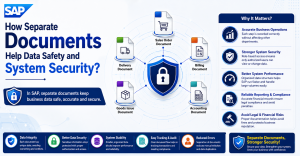
Separate documents help the company give the right permissions to the right workers. Warehouse workers can only see or change stock documents. They cannot see secret money ledgers or company profit data. This separation stops wrong changes and blocks accidental mistakes. It ensures mistakes in one department do not ruin data of another department.
Why Auditors and Law Need Multiple SAP Documents?
Outside auditors must trace every money entry back to physical items easily. Multiple documents give a clean history by locking every change. If a money entry looks wrong, an auditor can find the original material movement document easily. This tracking is mandatory for international laws and accounting rules. If you do SAP ABAP Training in Gurgaon, you learn how code makes these rules work.
How Document Flow Links All SAP Records Together?
SAP connects all these separate documents with a special tool called “Document Flow.” This tool works like a chain linking every document together. Users can open any document and see the full history of that business. This connected system stops manual searching and saves lots of time every day.
What Bad Things Happen If SAP Uses Only One Document?
If SAP use only one document per transaction, it’s going to cause huge confusion business. Different teams over writing different bits of information at the same time. Just by changing the item’s weight you’ll actually change the calculation of tax value by mistake. Your system’s speed will also come down because the database will not be able to process that huge chunk of confusing data. And the company will never be able to view their financial reports correctly, which might lead to huge law penalties. These concepts are essential to all SAP professionals, as document flow maintains the workflow. SAP SD can provide SAP professional the rationale behind having multiple linked documents instead of a single document, it equips trainees to tackle real SAP projects effectively and enhances problem-solving in the sales and distribution department. The knowledge imparted on the interrelation between sales orders, deliveries, billing documents and accounting documents will boost a professional’s grasp of business processes, minimizing operational mistakes and ensuring data consistency for reliable reports and smooth functioning of implementation, support, and end-user tasks in a live SAP environment.
Conclusion:
Creation of multiple documents for the same transaction is not an error. It is the greatest advantage of the architecture of a large enterprise system. As a result of this division between stocks and accounting, it is possible to reach maximum security and maximum speed of the database. It will enable every department to work fast with the real-time status of the firm.