

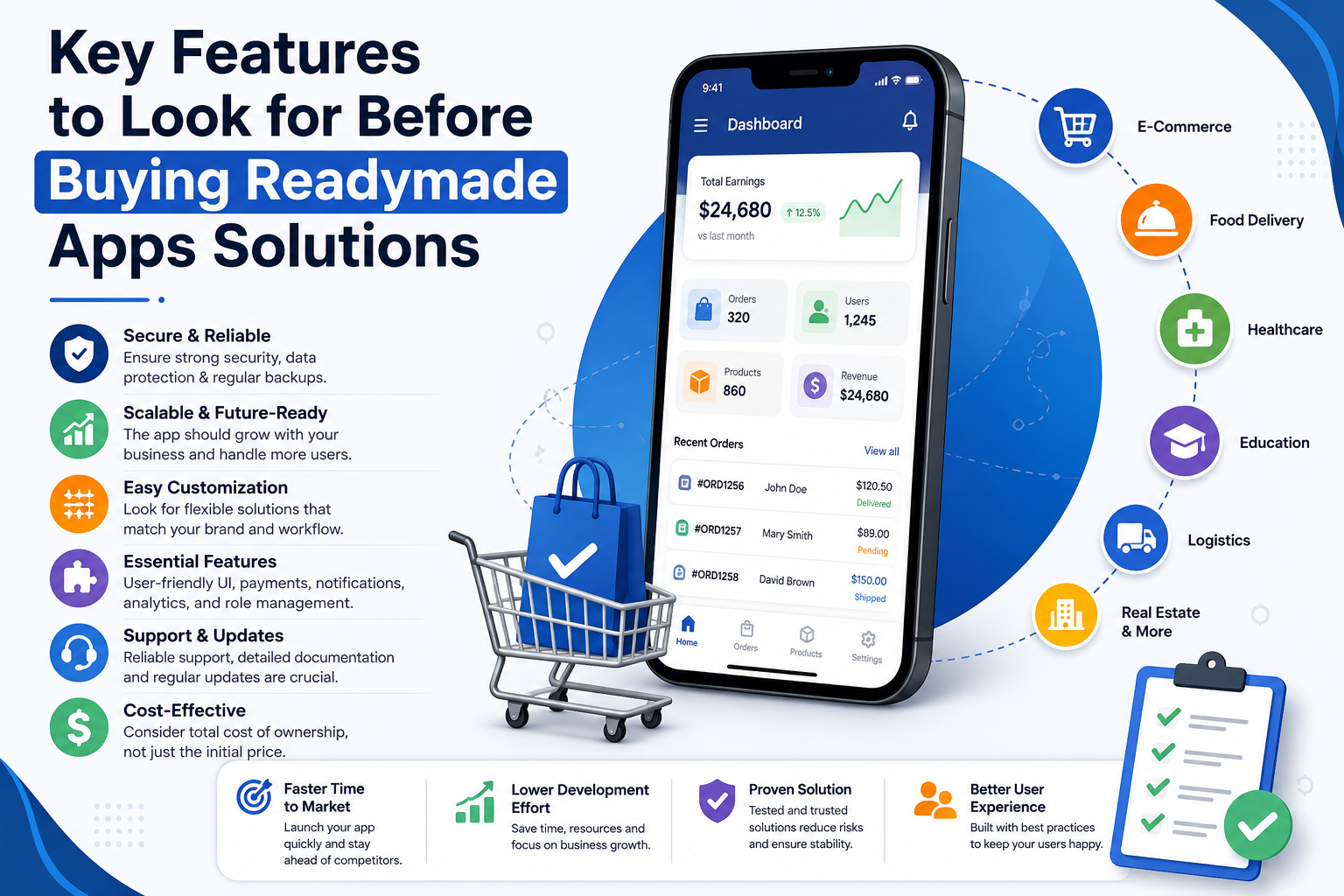
Building a mobile application from scratch sounds exciting until you look at the timeline, development cost, testing process, and ongoing maintenance. That’s why many businesses now evaluate ready-built application products before investing in custom development. Whether you’re launching a startup, expanding an existing business, or validating a new idea, choosing the right solution requires more than comparing screenshots and pricing.
The real value comes from understanding what sits behind the interface. A readymade application should save time without creating technical limitations later.
Understand Your Business Requirements First
Before comparing different readymade apps on sale for multiple industries, spend some time defining your own business goals. An readymade application that works perfectly for healthcare may not suit logistics, while an eCommerce platform might miss essential features needed for appointment booking.
Ask yourself a few practical questions:
- What business problem should the app solve?
- Will users access it on Android, iOS, or both?
- Does the app require real-time notifications?
- Will customer data need advanced security?
- Can the application scale as traffic grows?
Starting with these answers makes feature comparison much easier and prevents unnecessary spending.
Evaluate Core Features Instead of Fancy Designs
An attractive interface matters, but functionality matters far more.
Many buyers focus on colorful dashboards while ignoring the technical capabilities underneath. Later, they discover missing payment options, limited integrations, or poor admin controls.
A quality readymade solution should typically include:
- Secure user authentication
- Responsive UI across devices
- Push notification support
- Multiple payment gateway compatibility
- Order and transaction management
- Analytics dashboard
- User role management
- API integration support
Think of the design as the cover of a book. The real value is inside.
Check the Technology Stack and Scalability
Technology decisions affect future growth.
If the readymade application uses outdated frameworks, adding new features later can become expensive. Modern development generally relies on scalable architectures, cloud compatibility, REST APIs, and databases capable of handling increasing traffic.
When reviewing technical documentation, look for details about:
- Backend architecture
- Database technology
- API documentation
- Source code quality
- Cloud deployment support
- Performance optimization
- Version compatibility
These technical elements may not seem exciting today, but they become extremely important once your user base starts growing.
Consider Security and Compliance Before Anything Else
Security should never be treated as an optional feature. Businesses handling customer information, payment details, or personal records must ensure the application follows modern security practices. Features like encrypted databases, secure authentication, regular security updates, backup mechanisms, and compliance with regional data regulations reduce long-term risks. Even businesses operating in competitive markets often prioritize security before adding new customer-facing features because protecting user trust has a direct impact on sustainable growth.
Compare Total Cost Instead of Initial Price
A lower purchase price doesn’t always mean better value.
Many businesses forget to calculate long-term ownership expenses.
Besides the initial purchase, consider:
- Hosting costs
- Annual maintenance
- Software updates
- Third-party API subscriptions
- Payment gateway charges
- Cloud infrastructure
- Technical support fees
- Future customization costs
Sometimes a slightly more expensive solution becomes significantly cheaper over three years because it requires fewer modifications.
Looking at the total cost of ownership gives a much more accurate financial picture.
Customization Flexibility Matters
Every business eventually changes.
New customer demands appear. Regulations evolve. Competitors introduce fresh features.
Your application should allow reasonable customization without rebuilding the entire system.
Useful customization options include:
- Theme modifications
- Branding support
- Feature extensions
- Additional modules
- Language localization
- Currency support
- Multi-vendor capability
- Third-party integrations
Flexibility protects your investment and keeps the software useful for a longer period.
Industry-Specific Features Can Save Significant Development Time
Different industries require different workflows.
A restaurant ordering platform needs menu management and delivery tracking.
Healthcare applications may require appointment scheduling, electronic records, and patient notifications.
Education platforms usually include course management, quizzes, and student dashboards.
Real estate applications focus on property listings, map integration, and lead management.
Retail businesses often prioritize inventory synchronization, loyalty programs, and payment processing.
Choosing software that already understands your industry’s workflow reduces unnecessary customization while improving operational efficiency.
User Experience Should Be Tested, Not Assumed
You can often identify usability problems within five minutes.
Try navigating every important workflow:
- Registration
- Login
- Product search
- Checkout
- Payment
- Notifications
- Profile management
- Customer support
Pay attention to loading speed.
Notice how many taps are required to complete common tasks.
If you find the process confusing, your customers probably will too.
Simple navigation usually leads to better user engagement and lower abandonment rates.
Support, Documentation, and Updates Are Long-Term Assets
Many buyers overlook documentation.
That becomes a problem during deployment or future modifications.
Reliable software usually includes:
- Installation guides
- API documentation
- Developer manuals
- Version history
- Bug fixes
- Update roadmap
- Technical support channels
- Community knowledge base
Regular updates indicate that the application continues evolving with changing technologies instead of becoming outdated.
Common Mistakes Buyers Should Avoid
A few mistakes appear repeatedly across businesses purchasing ready-built software.
Avoid these common issues:
- Choosing based only on price
- Ignoring scalability
- Skipping security evaluation
- Forgetting maintenance costs
- Not reviewing source code quality
- Overlooking documentation
- Assuming every feature works without testing
- Ignoring future customization requirements
Avoiding these mistakes often saves both money and development time.
Final Thoughts
Buying a ready-built application isn’t simply about purchasing software—it’s about selecting a foundation that can support your business as it evolves. The right decision comes from balancing functionality, security, scalability, usability, industry relevance, and long-term operating costs rather than focusing on appearance alone. As mobile commerce and digital services continue expanding, businesses across sectors are also exploring specialized solutions, including a readymade food delivery app like 7Now, to better understand how industry-specific features can streamline operations and improve the overall customer experience.
1. What are readymade app solutions?
Readymade app solutions are pre-built mobile or web applications that include essential features required for a specific business model. They allow businesses to launch faster compared to developing an application entirely from scratch while still offering opportunities for customization.
2. How do I choose the right readymade app for my business?
Start by identifying your business requirements, target audience, and required features. Then compare solutions based on scalability, security, technology stack, customization options, documentation, support, and long-term maintenance costs rather than focusing only on the purchase price.
3. Are readymade apps customizable?
Yes, most modern readymade applications support customization. Businesses can typically modify branding, user interface, features, integrations, payment methods, languages, and other components depending on the software architecture and licensing terms.
4. Which industries benefit most from readymade app solutions?
Many industries can benefit, including eCommerce, food delivery, healthcare, education, logistics, real estate, travel, fitness, on-demand services, and appointment booking. Industry-specific solutions often reduce development time because they already include essential business workflows.
5. Is buying a readymade app more cost-effective than custom development?
For many businesses, it can be. Readymade apps generally reduce development time and upfront costs. However, it’s important to evaluate the total cost of ownership, including hosting, maintenance, updates, third-party integrations, and future customization, before making a decision.




















Leave a Reply