Introduction
Shopping for gadgets & electronics these days feels different than it did even five years ago. There’s more choice, more noise, and honestly, more junk mixed in with the genuinely useful stuff. Whether you’re after something that fixes an everyday annoyance or a device you’ll actually use daily, the goal is the same — buy smart, not fast.
This guide walks through the categories of small electronics people actually search for, what makes one option better than another, and how to avoid wasting money on gear that ends up in a drawer. We’ll cover phone accessories, content-creation tools, charging solutions, and anti-loss trackers, since these represent the everyday problems most buyers are actually trying to solve.
Phone Accessories That Actually Solve a Problem
Not every accessory deserves shelf space. The ones worth buying are the ones that remove friction from something you do constantly — holding your phone steady, charging it on the go, or keeping calls hands-free. A cheap plastic stand that wobbles or a charger that overheats isn’t saving you money; it’s just delaying the purchase you’ll eventually have to make anyway.
Take something like a phone mount with automatic face tracking. These use a small motor and basic tracking to follow your face during video calls or recordings, which is genuinely handy if you’re doing calls, tutorials, or livestreams without a second person to hold the camera. It’s a small device, but it solves a real problem — staying in frame without constantly adjusting your phone.
Charging cables have quietly gotten smarter too. A wearable charging cable in bracelet form sounds like a gimmick until your phone dies at 2% right before you need to make a call — then it’s the most useful thing in your pocket. It’s not a replacement for a proper charger, but as a backup, it earns its place.
Content Creation Gear Worth Owning
If you make videos, take a lot of photos, or just want steadier footage without hiring a camera crew, this category has genuinely improved. A decade ago, stabilization tech was expensive and clunky. Now it’s compact enough to fit in a bag.
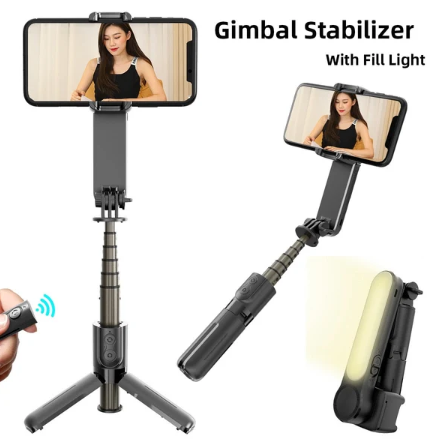
A handheld gimbal stabilizer smooths out the shake that ruins otherwise good footage — walking shots, panning, anything where your hand naturally trembles more than you’d like. If you’ve ever watched your own video back and cringed at how jittery it looked, this is the fix.
Pair that with a multi-function selfie stick with a built-in tripod and LED light, and you’ve basically got a mini production setup. The tripod mode alone changes what’s possible — group shots, hands-free video, low-light selfies that don’t look washed out. None of this requires a big budget; it just requires picking tools that do more than one job.
Small Devices That Save You From Bigger Headaches
Some electronics aren’t exciting, but they quietly prevent annoying situations. Anti-lost trackers are a good example. Anyone who’s spent twenty minutes tearing apart a bag looking for keys knows the appeal instantly.
A compact Bluetooth anti-lost tracker pairs with your phone and pings when your keys, bag, or even pet wanders further than expected. It won’t replace a full GPS tracking system, but for everyday “where did I put that” moments, it’s more than enough.
Then there’s the stuff that just makes maintenance easier. An ultrasonic cleaner for jewelry and lenses uses sound waves to loosen grime from tiny crevices — the kind of dirt a cloth or brush simply can’t reach. Glasses, camera lenses, watch straps, rings — anything with detail work benefits from this rather than scrubbing by hand and risking scratches.
Adapters and the Case for Buying Once
Adapters are boring until you need one and don’t have it. Most people only think about this after their favorite pair of headphones no longer plugs into their new phone.
A 2-in-1 audio and charging adapter solves the classic problem of wanting to charge your phone while listening through wired headphones at the same time. It’s a five-dollar fix to a problem that otherwise means choosing between battery life and audio. Buy a decent one once, and you’ll stop thinking about it entirely — that’s really the standard to hold small electronics to.
What to Actually Check Before Buying
Price isn’t the only thing that matters, though it’s obviously part of the decision. A few habits make a real difference:
Read the actual product description, not just the headline photo — specs like battery life, charging speed, or compatibility with your specific phone model matter more than they seem to at first glance. Check return policies too; anything electronic can arrive faulty, and a 30-day return window gives you room to test before committing. Look at whether a product does one job well versus several jobs poorly — multi-function gadgets are great when the core function still works properly, and useless when it’s a compromise on everything.
It also helps to think about how often you’ll actually use something. A gimbal is worth the investment if you record regularly. It’s a waste if you’ll use it twice and forget about it. Buying with actual use in mind, rather than the appeal of a demo video, tends to separate satisfied buyers from people quietly returning things a week later.
Where Zeniqas Fits In
If you’d rather skip the research and just browse a curated set of these categories in one place, Zeniqas puts phone accessories, content-creation tools, chargers, and anti-lost trackers together under one collection. It’s a reasonable starting point if you want to compare a few practical options without digging through dozens of unrelated listings.
FAQs
What’s the most useful gadget for someone who isn’t a tech enthusiast?
Honestly, a good Bluetooth tracker or a reliable charging adapter tends to get used far more often than flashier gadgets. Utility beats novelty most of the time.
Are cheaper electronics accessories worth buying?
Sometimes, yes — especially for adapters and cables where the technology is simple. For anything with a motor or sensor, like a gimbal or tracker, it’s worth spending a bit more for reliability.
How do I know if a gadget will actually get used?
Ask whether it solves something you deal with weekly, not just occasionally. Devices tied to daily habits — charging, taking photos, finding keys — get used. Novelty gadgets usually don’t.
Is it better to buy multi-function gadgets or single-purpose ones?
Depends on execution. A well-made multi-function device, like a selfie stick that doubles as a tripod, is genuinely efficient. A poorly made one just does two things badly instead of one thing well.
Conclusion
Buying gadgets and electronics doesn’t need to be complicated, but it does require a little intention. The best purchases are usually the boring, useful ones — a tracker that saves you from losing your keys, an adapter that stops you from choosing between charging and listening, a stabilizer that makes your videos look better without extra effort.
Skip the flashy stuff that solves problems you don’t actually have, and focus on what fits your daily routine. That’s really the whole strategy.