

Drone technology has revolutionized industries such as surveying, mapping, and geospatial analysis. These unmanned aerial vehicles (UAVs) are now essential tools for collecting accurate, high-resolution data. However, to ensure that drone-collected data aligns with real-world coordinates, ground control points (GCPs) play a critical role. In this article, we’ll explore what ground control points are, how they work, and why they are essential for drone mapping and surveying projects.
What are Ground Control Points (GCPs)?
Ground control points are physical locations on the Earth’s surface with precisely measured coordinates. These points are used to geo-reference aerial images or survey data collected by drones, enabling the transformation of raw data into accurate maps or models that align with Earth’s coordinate system.
In drone mapping GCPs serve as reference points to calibrate the drone’s camera and sensors, ensuring that aerial images correspond accurately to their real-world locations. This accuracy is particularly important for creating reliable maps, 3D models, or point clouds.
The Importance of GCPs in Drone Mapping
Drone mapping relies heavily on accurate georeferencing, especially when the data collected will be used for high-precision tasks such as topographic surveys, construction planning, or environmental studies. Without GCPs, the resulting map could be distorted or misaligned, leading to measurement errors and potentially costly mistakes.
Here’s why ground control points are so important for drone mapping:
- Accuracy: GCPs ensure that the drone’s data corresponds to the correct ground coordinates, providing accuracy and eliminating errors that could arise from relying solely on the drone’s GPS.
- Consistency: By using fixed, precisely known locations as reference points, surveyors can maintain consistency in measurements across multiple drone flights or surveys.
- Improved Post-Processing: GCPs make it easier to process aerial images and geospatial data, as the software can use these points to better align images and data from different flights, helping to create more accurate maps and models.
How Ground Control Points Are Used in Drone Surveying
Integrating ground control points into a drone survey involves several steps, from planning to post-processing. Here’s a step-by-step breakdown of how GCPs are used in drone surveying:
Step 1: Planning the Survey
Before flying a drone for mapping, it’s crucial to plan where to place the GCPs. These points should be spread across the area of interest and be visible from multiple angles during the drone flight. The points should also be placed in open areas with a clear line of sight to the drone to avoid interference from obstacles such as trees or buildings.
Step 2: Marking and Measuring GCPs
Once the locations for the GCPs are chosen, surveyors need to measure their precise coordinates. Typically, this is done using high-precision GPS equipment, such as a GNSS receiver, which provides accurate readings down to the centimeter. These measurements are crucial, as the accuracy of the GCPs directly impacts the accuracy of the resulting map or model.
Step 3: Flying the Drone
Once the GCPs are established and their coordinates are recorded, the drone can be flown over the area to capture aerial images or data. The flight path should be designed to ensure that the drone passes over each GCP, capturing clear imagery of the reference points.
Step 4: Post-Processing and Georeferencing
After the drone flight, the images or data collected must undergo post-processing. During this stage, photogrammetry software aligns the drone images with the GCPs. By comparing the recorded coordinates of the GCPs with the corresponding locations in the drone images, the software can geo-reference the data, ensuring that the final map or model is accurate and aligned with real-world coordinates.
Step 5: Verifying Accuracy
Once the georeferencing is complete, the final step is to verify the accuracy of the mapping. This can be done by comparing the coordinates of the GCPs in the final map with their actual known coordinates. Any discrepancies can be corrected by adjusting the data during the post-processing phase.
Types of Ground Control Points Used in Drone Mapping
Not all ground control points are the same, and there are different types based on the method used to measure or mark them. Here are the most common types of GCPs used in drone surveying:
1. Visible GCPs
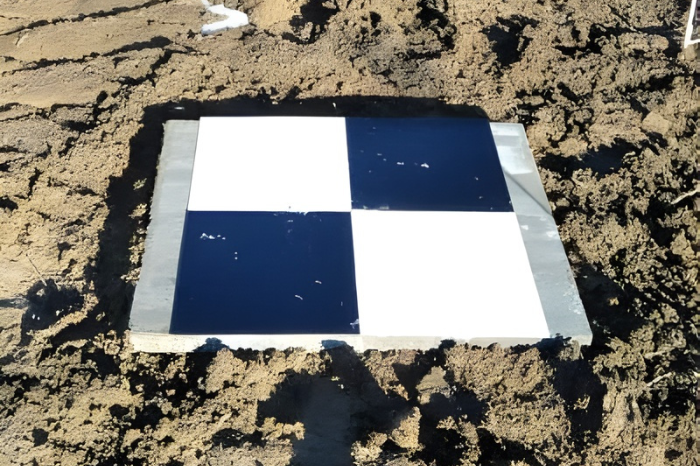
Visible GCPs are marked locations that are visible to the drone during its flight. These could be physical markers such as painted targets on the ground, flags, or other distinguishable objects. They are easy to spot from the drone and are used when the survey area is not heavily obstructed.
2. Survey GCPs
Survey GCPs are highly accurate points measured using GNSS receivers or total stations. These GCPs are often used in large-scale, high-precision surveys, such as construction or mining projects, where accuracy is critical. Survey GCPs are typically marked with survey stakes, flags, or other physical markers.
3. Virtual GCPs
Virtual GCPs are calculated using photogrammetric techniques. These points are not physically marked but are derived from overlapping images taken by the drone. While less accurate than survey GCPs, virtual GCPs can be used in applications where ultra-high accuracy is not required.
Advantages of Using Ground Control Points in Drone Surveys
Ground control points offer several key benefits that enhance the accuracy, efficiency, and usability of drone surveys. Some of the top advantages include:
- Enhanced Accuracy: GCPs correct for discrepancies in GPS positioning or flight altitudes, resulting in highly accurate geospatial data.
- Better Quality Models: When drone-collected data is calibrated with GCPs, the resulting 3D models, point clouds, or maps have much higher quality and reliability.
- Precision for Detailed Analysis: In industries such as construction, land surveying, and environmental monitoring, high precision is paramount. GCPs help provide the level of detail necessary for these tasks.
- Multi-Site Compatibility: GCPs ensure that drone data can be integrated across multiple sites or collected over time, creating consistency in large-scale projects.
Best Practices for Using Ground Control Points in Drone Mapping
To get the most accurate and reliable results when using ground control points, consider the following best practices:
– Plan GCP Locations Strategically
Ensure that GCPs are spread out across the survey area, ideally positioned in corners and key locations. These points should also be easily visible from different angles.
– Ensure GCP Visibility
During the drone flight, ensure the GCPs are clearly visible in the drone’s camera footage. If the GCP is obscured by obstacles or environmental factors, the drone might not capture accurate data.
– Use High-Precision Equipment
For surveying projects requiring high levels of accuracy, use the best GNSS receivers and surveying equipment available to measure GCPs.
– Double-Check GCP Measurements
Before beginning the drone flight, double-check the GCP coordinates to ensure they are correct. Mistakes in this step can result in misaligned data.
– Consider the Terrain
When planning GCP placements, consider the terrain of the survey area. Uneven terrain can make it difficult for drones to maintain a consistent altitude, thereby affecting the accuracy of the collected data.
Conclusion
Ground control points are an indispensable part of drone surveying and mapping. They provide the accuracy and reliability necessary to create precise, geo-referenced maps and 3D models. Whether you are working on a large construction project, conducting land surveys, or capturing environmental data, GCPs ensure that the data you collect is reliable and usable. By understanding their role, implementing them, and following best practices, surveyors can maximize the value of drone technology in geospatial analysis.






















Leave a Reply