

Introduction
If you’ve ever printed multiple copies of a document, you might have noticed the option to collate. But what does “collate” mean in printing? Understanding this term can save you time, prevent confusion, and ensure your documents are organized correctly. Whether you’re printing reports, booklets, or presentations, knowing how collate works is essential for professional results.
What Does Collate Mean in Printing?
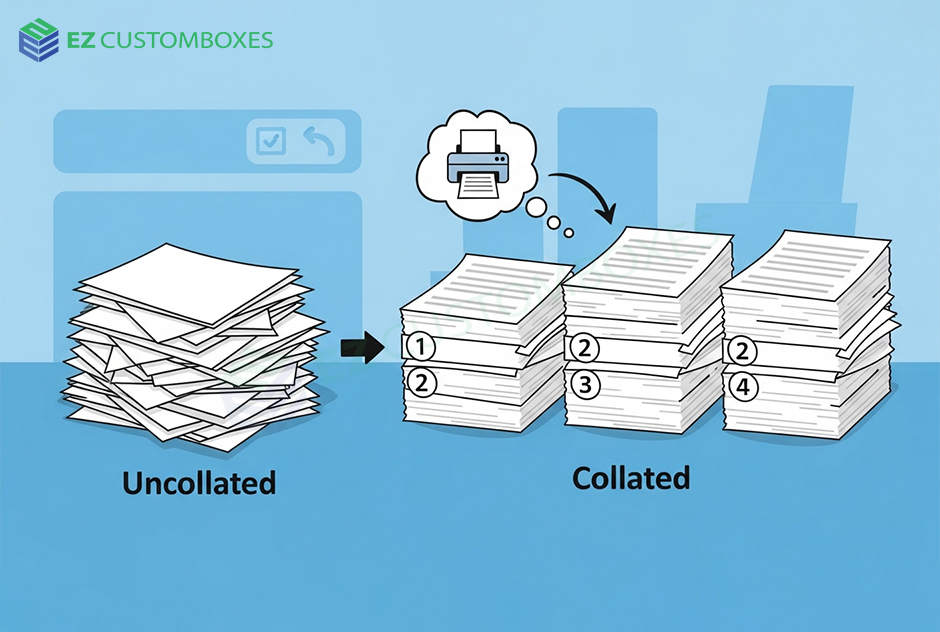
What does collate mean when printing. In printing, collate refers to the process of arranging multiple pages of a document in a specific order. Instead of printing all copies of page 1 first, then page 2, collating prints the full set of pages in sequence before starting the next copy.
Example:
- Non-collated: 3 copies of a 3-page document → 1,1,1 / 2,2,2 / 3,3,3
- Collated: 3 copies → 1,2,3 / 1,2,3 / 1,2,3
Collating ensures that your documents are ready to use immediately after printing, without extra sorting.
How Collate Works in Printing
Modern printers use either hardware or software to collate documents.
Step-by-Step Collation Process
- Printer receives multiple copies request
- Pages are organized in sequential order
- Each complete set is printed one after the other
- Documents come out ready for distribution
This feature is especially useful for:
- Reports
- Booklets
- Exams and handouts
- Marketing materials
Why Collating Matters
Collating is not just a convenience—it prevents mistakes and saves time.
Key Benefits of Collating
- Saves Sorting Time: No need to manually arrange pages.
- Reduces Errors: Ensures pages are in correct order.
- Professional Appearance: Documents are neat and ready to distribute.
- Ideal for Large Print Jobs: Especially when printing hundreds of copies.
Collate vs Non-Collate: Understanding the Difference
| Feature | Collate | Non-Collate |
|---|---|---|
| Page Order | 1,2,3 / 1,2,3 | 1,1,1 / 2,2,2 / 3,3,3 |
| Time Efficiency | Faster for sorting | Slower; requires manual arrangement |
| Best Use Case | Multi-page documents | Single-page or simple prints |
Tips for Using Collate in Printing
- Always check the number of copies before printing
- Ensure the printer supports collate function
- For double-sided printing, collate ensures correct order
- Test with a small batch to confirm results
FAQs (Featured Snippet Optimized)
Q1: What does collate mean when printing?
The collate meaning arranging printed pages in order so each set is complete and sequential.
Q2: Do I need to collate my documents?
Use collate when printing multi-page documents for distribution—it saves time and avoids errors.
Q3: How is collate different from non-collate?
Collate prints full sets sequentially; non-collate prints all copies of each page together.
Q4: Can all printers collate?
Most modern printers and print drivers support collate, but some older models may not.
Q5: Is collate useful for double-sided printing?
Yes, collating ensures that pages are in correct order on both sides, preventing confusion.
Conclusion (CTA)
Understanding collate meaning printer can save time, reduce errors, and make your documents look professional. Next time you print reports, booklets, or handouts, always check the collate option for smooth, organized results.
Try collating your next print job to see the difference in efficiency and organization!






















Leave a Reply