

A good Google Slides presentation requires more than just adding text to various templates. What you need is proper structure, relevant images, clear messaging, and uniform formatting. And this is where artificial intelligence can be used to handle most of these jobs for you while still giving you control over the end product.
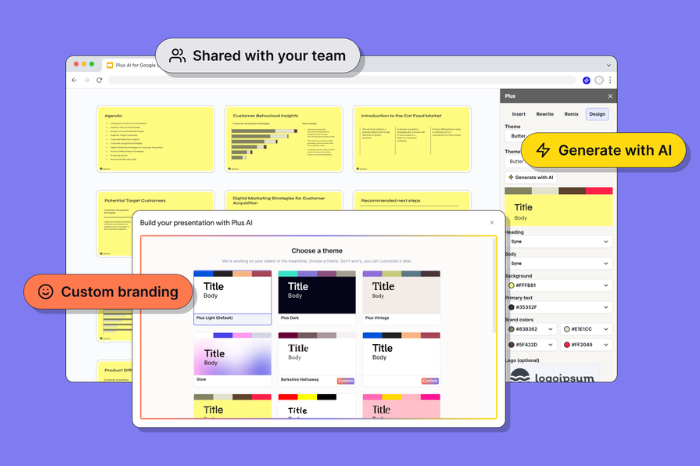
Plus AI is one of those tools that allow you to create and modify your presentation within Google Slides without any transfer to another presentation platform. Plus, AI can create presentations based on a prompt or an uploaded document, rewrite slide content, reformat slides, and even add images, icons, charts, and tables.
These are some examples of how you can apply AI to your Google Slides presentations.
Start With a Clear Presentation Structure
A presentation that is logically organized becomes more comprehensible than an unconnected set of slides. AI can assist you in converting your broad topic into a logical presentation format.
Rather than creating individual slides from the start, give the AI your presentation goals, target audience, key points, and preferred length. The AI will assist you in organizing the content into parts such as introduction, discussion, support, and conclusion.
In the case of a sales presentation, your presentation may be organized around your client’s problem, the proposed solution, the benefits, and the supporting data, among other things.
This will give you a solid foundation even before designing your slides.
Turn Existing Documents Into Presentations
Presentation creation does not always begin on empty slides. You may already have a report, research paper, proposal, or PDF that contains the information you will need.
In addition, AI allows you to upload documents such as PDFs, Word documents, PowerPoint documents, and text documents and generate presentations based on the content of the document.
This will save you some time and labor in copying information from the document and dividing it among the slides. You can then review the generated presentation, remove unnecessary information, and adjust the content to suit your audience.
Improve Slide Text With AI
Large paragraphs tend to complicate the process of preparing a presentation. Slides should, as a rule, reinforce your speech, not copy all of it.
The help from AI may consist in compressing large sentences, summarizing long pieces of text, adjusting the tone of a passage, and changing wording according to the specific audience requirements. In addition, there is a Rewrite option in AI that will allow elaborating on something, summarizing, or modifying wording and tone.
For instance, a large paragraph describing different product advantages may be turned into three short items that you will explain orally.
Reformat Existing Slides
Sometimes the information on a slide is useful, but the layout is not. A slide containing several paragraphs, for example, may work better as a comparison, timeline, process diagram, or other visual format.
Plus AI’s Remix feature can reformat existing slides into different layouts.
This is particularly useful when updating an old presentation. Rather than rebuilding every slide manually, you can use AI to explore alternative structures and then choose the format that best communicates the information.
Create Better Visuals
Visual elements can make complex information easier to understand. AI can assist with generating images and adding icons, charts, and tables to presentations. Plus AI supports editable charts and tables in Google Slides and PowerPoint.
For example, instead of describing quarterly performance in a paragraph, you could present the figures in a chart. A process can be displayed as a sequence of steps, while a comparison can use a structured table.
However, visuals should have a purpose. Adding an image simply to fill empty space can distract from the message.
Maintain Consistent Branding
Presentations have to adhere to brand guidelines in most cases. Fonts, colors, logos, and even layouts should remain the same throughout the presentation.
Custom branding is also an available feature in Plus AI. This feature includes logos, fonts, colors, custom templates, and presets.
Inconsistency in design elements may detract from the professionalism of presentations. It is also hard for people to identify the organization that created a presentation.
Translating Presentations for Different Audiences
AI may come in handy if a presentation needs to be translated into another language. According to Plus AI, it can read, write, and translate almost any language.
This feature can benefit international businesses, educators, and businesses working in various regions. After the translation is complete, make sure you review the terminology carefully.
Use AI to Create Individual Slides
You do not always need AI to generate an entire presentation. Sometimes only one slide needs improvement.
Plus AI allows users to create individual slides through its Insert feature. This can be useful when you need to add an executive summary, a comparison table, a timeline, a case study, or a supporting slide to an existing deck.
This approach also gives you more control because you can use AI for specific tasks without changing the entire presentation.
Review AI-Generated Content Before Presenting
AI can save time, but it should not replace human review. Plus’s terms state that AI-generated results depend on user input and are not intended to be final or definitive, and that users are responsible for reviewing and using the resulting content.
Check statistics, names, dates, calculations, quotations, and technical claims before presenting them. Also make sure every slide supports your central message.
Make AI Part of Your Presentation Workflow
The best approach to using AI in Google Slides is to treat it as an assistant, not as a way to automatically replace presentation creation.
Leverage AI to generate the basic structure, convert existing content into slides, improve wording, experiment with layouts, and develop visual elements. Next, rely on your skills to check the data and finalize the story.
Plus AI is designed to work directly within Google Slides and PowerPoint, which means you can use AI-assisted creation and editing without abandoning your existing presentation workflow.
If used wisely, the technology will allow you to save time on repetitive tasks and focus on the essential part – developing a useful presentation for your audience.


























Leave a Reply