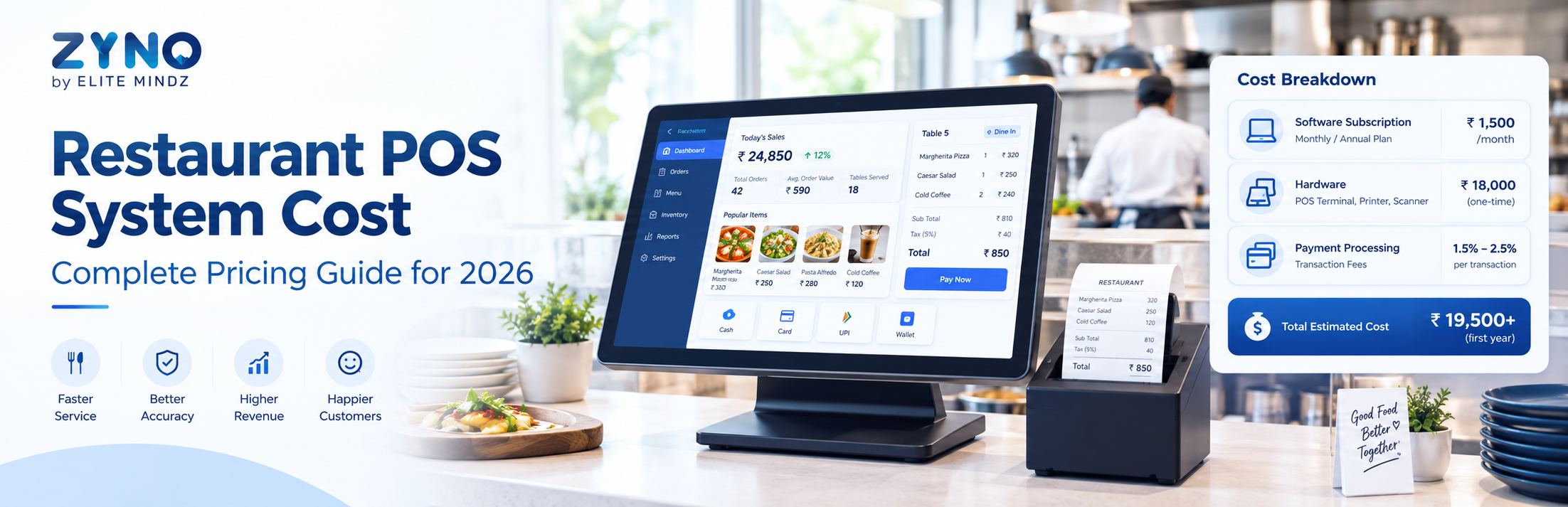
Choosing a restaurant POS system is an important business decision because the cost goes beyond the software subscription. Restaurant owners may also need to consider hardware, payment processing, installation, integrations, support, and employee training.
A modern restaurant POS system can manage billing, orders, payments, inventory, customer information, and sales transactions from one platform. Understanding the different pricing models can help restaurant owners compare solutions based on their actual requirements.
This guide explains restaurant POS system cost in 2026, the factors that influence pricing, common pricing models, and what to check before purchasing a POS solution.
What Is a Restaurant POS System?
A restaurant POS system is software that helps restaurants manage sales and day-to-day transactions. Instead of handling orders and billing manually, restaurant staff can use the POS system to record orders, generate bills, process payments, and track sales.
Depending on the solution, restaurant POS software may include:
- Order management
- Billing and invoicing
- Payment processing
- Table management
- Inventory management
- Menu management
- Sales reporting
- Customer management
- Employee management
- Online ordering integration
- Multi-outlet management
- Transaction reporting
For restaurants, cafes, cloud kitchens, QSRs, and other food businesses, POS software can connect front-office transactions with back-office operations.
How Much Does a Restaurant POS System Cost in 2026?
There is no single price for restaurant POS software because vendors use different pricing structures.
The total cost can depend on:
- Number of POS terminals
- Number of restaurant locations
- Software features
- Hardware requirements
- Payment integrations
- Inventory and accounting integrations
- Online ordering requirements
- Customer loyalty features
- Implementation and training
- Technical support
Some providers charge a monthly or annual software subscription, while others combine software, hardware, payment processing, and support into a package.
Therefore, restaurant owners should compare the total cost of ownership instead of looking only at the advertised monthly subscription.
Common Restaurant POS Pricing Models
1. Subscription-Based POS Pricing
Under a subscription model, restaurants pay a recurring monthly or annual fee for using the POS software.
The price may vary according to the number of users, terminals, locations, or features included in the selected plan.
This model can be useful for businesses that want predictable recurring software expenses.
2. Per-Terminal Pricing
Some POS providers charge according to the number of terminals or devices.
For example, a restaurant with multiple billing counters may require more licenses than a small single-counter cafe.
Before choosing this model, check whether additional terminals incur separate software charges.
3. Hardware-Based Pricing
A restaurant may also need POS hardware such as:
- POS terminals
- Touchscreen displays
- Receipt printers
- Barcode scanners
- Cash drawers
- Kitchen display systems
- Customer-facing displays
Hardware costs are generally separate from software in some POS packages, while other providers may bundle hardware and software.
4. Transaction-Based Pricing
Some restaurant POS solutions involve transaction-related charges, particularly when integrated with payment processing.
In this model, the restaurant may pay a fee based on payment transactions or payment volume.
When comparing providers, ask whether transaction fees apply to card, digital, online, or other payment methods.
What Does a Restaurant POS System Include?
The software subscription may include several features depending on the plan.
Order Management
Staff can enter dine-in, takeaway, and delivery orders directly into the POS.
Restaurant Billing
The system can automatically calculate item prices, taxes, discounts, and the final bill.
Payment Management
A POS system can help manage different payment methods and record completed transactions.
Inventory Management
Inventory functionality can help restaurants monitor ingredients, stock movement, consumption, and availability.
Sales Reporting
Restaurant owners can analyze sales, revenue, order volume, product performance, and other business metrics.
Table Management
For dine-in restaurants, table management can help staff track occupied, available, and reserved tables.
Additional Costs to Consider
The software subscription isn’t always the complete restaurant POS system cost.
POS Hardware
Restaurants may need to purchase or lease compatible hardware.
Payment Processing
Payment providers can charge processing fees depending on the payment method and agreement.
Installation
Some businesses may require professional installation or configuration.
Employee Training
Staff may need training before the POS system goes live.
Integrations
Connecting POS software with accounting, inventory, delivery, CRM, or online ordering platforms may involve additional costs.
Support and Maintenance
Check whether customer support is included in the subscription or charged separately.
Restaurant POS System Cost by Business Type
Different restaurants have different POS requirements.
Small Restaurant
A small restaurant may need basic billing, order management, payment processing, and inventory features.
The primary focus should be affordability and ease of use.
Cafe
A cafe may prioritize fast billing, menu management, inventory tracking, and customer transactions.
Quick-Service Restaurant
QSRs typically need fast order processing, payment handling, kitchen coordination, and sales reporting.
Cloud Kitchen
A cloud kitchen may prioritize online order integration, delivery management, inventory, and transaction tracking.
Multi-Outlet Restaurant
A growing restaurant chain may need centralized reporting, multiple-location management, standardized menus, inventory visibility, and consolidated sales data.
How to Calculate the Total POS Cost
Restaurant owners can use a simple formula:
Total POS Cost = Software + Hardware + Setup + Integrations + Payment Costs + Training + Support
For example, suppose a restaurant has:
- POS software subscription
- Two POS terminals
- Receipt printers
- Payment integration
- Employee training
- Inventory integration
The restaurant should calculate all of these costs before comparing competing POS systems.
This provides a more realistic picture of the investment.
How to Choose a Restaurant POS System in 2026
Price should be one factor in the decision, but it shouldn’t be the only consideration.
1. Identify Your Requirements
List the features your restaurant actually needs.
Consider whether you require:
- Billing
- Order management
- Inventory
- Table management
- Payment processing
- Online ordering
- Customer loyalty
- Employee management
- Multi-location management
2. Compare Pricing Plans
Compare monthly, annual, per-terminal, and transaction-based charges.
Make sure you understand exactly what is included.
3. Check Transaction Fees
Ask the provider about payment-related charges and whether different transaction types have different fees.
4. Evaluate Hardware Requirements
Check which devices are compatible with the POS software and whether hardware is included.
5. Check Integrations
If you already use accounting, inventory, CRM, delivery, or online ordering software, verify whether the POS can integrate with those systems.
6. Consider Scalability
A POS system should support your future growth. If you plan to add locations, users, terminals, or online ordering channels, check whether the pricing model remains practical as you scale.
7. Request a Demo
A demo can help restaurant owners understand how quickly staff can create orders, process transactions, generate bills, and access reports.
Commercial Considerations Before Buying Restaurant POS Software
If you’re actively comparing restaurant POS software, consider the complete commercial package rather than focusing on the lowest subscription price.
Ask vendors:
- What is included in the software plan?
- Is hardware included?
- Are payment transactions charged separately?
- Are integrations included?
- Is setup included?
- Is employee training included?
- What support is provided?
- Are there additional charges for new terminals?
- What happens when another restaurant location is added?
- Are annual discounts available?
These questions can help you compare vendors more accurately.
Transaction Features to Look For
Because POS software handles daily restaurant transactions, transaction management should be a major part of your evaluation.
Look for features such as:
- Fast order entry
- Automated bill calculation
- Multiple payment methods
- Digital receipts
- Refund and cancellation management
- Discount handling
- Tax calculation
- Transaction history
- End-of-day reconciliation
- Sales reports
- Payment reports
These features can help restaurant managers maintain better visibility into daily sales activity.
Is Restaurant POS Software Worth the Cost?
The value of POS software depends on the restaurant’s size, transaction volume, operational complexity, and business requirements.
For a restaurant processing hundreds of orders and transactions, automation can reduce manual billing work and provide centralized sales information.
However, the right evaluation should consider both cost and functionality. A cheaper POS system may not provide the integrations, inventory controls, reporting, or scalability a growing restaurant requires.
The objective should be to select a system that fits the restaurant’s operational and commercial requirements.
Frequently Asked Questions
1. How much does a restaurant POS system cost in 2026?
Restaurant POS costs vary depending on software features, hardware, number of terminals, locations, integrations, payment processing, and support. There is no universal price for every restaurant.
2. What is included in restaurant POS software?
Depending on the provider, a restaurant POS may include billing, order management, payment processing, inventory, table management, reporting, customer management, and employee management.
3. Does restaurant POS software charge transaction fees?
Some POS solutions may involve transaction-related charges, particularly when payment processing is integrated. Restaurants should check the provider’s current pricing and payment terms.
4. Is POS hardware included in the software price?
Not always. Some providers bundle hardware with their POS plans, while others charge separately for terminals, printers, cash drawers, scanners, and other devices.
5. What is the difference between POS software and restaurant billing software?
Restaurant billing software primarily focuses on generating bills and recording sales. A restaurant POS system generally provides broader functionality, including order management, payments, inventory, reporting, and other operational features.
6. Can a restaurant POS system manage online orders?
Many modern POS platforms can integrate with online ordering and delivery channels. The exact integrations available depend on the POS provider.
7. Is cloud-based POS software better for restaurants?
Cloud-based POS software can provide centralized access to restaurant data and make it easier to manage multiple locations. Restaurants should evaluate connectivity, security, offline functionality, integrations, and vendor support before choosing a solution.
8. What should I check before buying restaurant POS software?
Check pricing, transaction fees, hardware requirements, features, integrations, scalability, security, implementation, training, customer support, and contract terms.
9. Can restaurant POS software manage multiple outlets?
Many POS platforms support multi-outlet operations, allowing businesses to manage locations, sales, menus, inventory, and reporting from a centralized system.
10. How can I compare restaurant POS system costs?
Create a total-cost comparison that includes software subscriptions, hardware, transaction charges, setup, integrations, training, support, and other recurring costs.
Final Thoughts
Understanding restaurant POS system cost is important before investing in restaurant technology. The cheapest plan isn’t necessarily the most suitable option, and the most expensive system may include features your business doesn’t need.
Restaurant owners should compare software functionality, transaction capabilities, hardware, integrations, scalability, support, and total cost of ownership.
A structured comparison can help you identify a restaurant POS system that fits your current operations while supporting future growth.